
GoKollab Community Notifications Workflow
A free snapshot that keeps your community alive. Automatic notifications for new posts, comments, and members inside GoHighLevel and GoKollab.
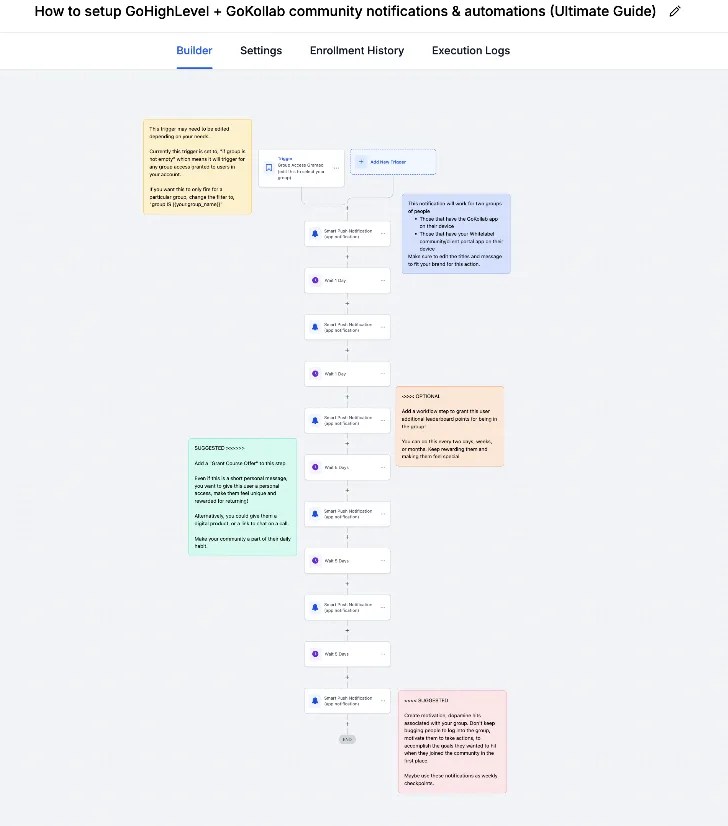
Why community notifications matter
A community dies quietly. Somebody posts, nobody sees it, they stop posting. Two weeks later the group is a ghost town and you are blaming the platform.
The fix is not more content. It is making sure people actually find out something happened. This snapshot handles that for you.
What the snapshot does
- Notifies members when a new post goes live in the group
- Pings the person who posted when someone comments on their thread
- Welcomes new members with a message that tells them where to start
- Nudges quiet members who have not logged in for a while
- Alerts you, the owner, so you can reply fast and keep momentum going
Watch the walkthrough
I recorded a full video showing how the snapshot is built and how to adjust it: https://youtu.be/uhUZMA9k-DA
How to install it
Click the button, log in to GoHighLevel, and load the snapshot into the account that runs your community. Open the workflows, turn each one on, and edit the message copy so it sounds like you rather than like me.
Check the send windows too. Nobody wants a community notification at 3am.
What to customize
- The welcome message, including the one link you most want a new member to click
- The quiet member nudge timing, usually seven or fourteen days
- Which channel each notification goes out on, email or SMS
- Whether owner alerts go to you or to a shared team inbox
If you are still deciding whether to start a community
Start one. A community is the cheapest retention tool you will ever run, and it turns customers into people who answer each other questions so you do not have to. This snapshot removes the part that usually kills it in month two.
Send it to my inbox.
Drop your email and we'll fire off the kit - plus the Monday newsletter if you want it.
No spam. Unsubscribe anytime.