
Part five of the GoHighLevel SEO series. Structured data for rich results and AI answers, Core Web Vitals on GHL hosting, custom code injection for canonicals and hreflang, and using AI content tooling without losing credibility.

This is part five, the last part, of a series on SEO inside GoHighLevel. Parts one through four covered the mechanics, launching, migrating and local. This one is the advanced end: structured data, speed, custom code, and the AI tooling that now ships inside the platform.
Everything here assumes the basics are already in place. Advanced technical SEO on a site with missing title tags is decoration on a house with no foundations.
1. Structured data and schema markup
Why it matters more now than it did
Schema is a machine-readable summary of what a page is about, written in JSON-LD and dropped into the page. It never directly boosted rankings, and for years its value was rich results: star ratings, FAQ dropdowns, event dates.
That changed with AI search. ChatGPT, Perplexity and Google's AI Overviews all need to work out quickly and unambiguously what an entity is, what it offers, where it operates and whether it is credible. Structured data hands them that on a plate rather than asking them to infer it from prose.
This is the core of answer engine optimisation. Getting cited by an AI is largely a question of being the easiest source to parse and verify. Schema is the cheapest way to be that source.
The native AI schema generator
GoHighLevel has a built-in generator under Sites > SEO and AEO Optimization > Schema Markup. It reads the page and proposes appropriate markup, which you review and publish.
It is a good starting point and a poor finishing point. It will get the type and the obvious fields right, and it will guess at the specifics. Always read what it generated before you publish it, because schema that contradicts your visible page content is worse than no schema at all.
The types that actually matter
Organization on your homepage. Name, URL, logo, contact details, and sameAs links to every profile you control. This is how a search engine builds the entity that is your business, and it is the foundation everything else attaches to.
LocalBusiness for anywhere with a physical presence. Address, geo coordinates, opening hours, price range, phone. Your NAP here must match your Google Business Profile exactly, character for character. Contradiction between the two is a trust problem.
Service on each service page. What it is, who provides it, what area it covers.
Product with offers if you sell something with a price. This drives price and availability in results.
FAQPage on pages with genuine question and answer sections. The questions and answers in the markup must appear visibly on the page. Marking up questions that are not on the page is a violation and it does get caught.
Article on blog posts. Headline, author, datePublished, dateModified, image. The author field matters more than people think. If you want AI systems to treat you as a credible source, the author needs to be a real person with a real profile that is linked and consistent across the web.
BreadcrumbList on nested pages. It puts the hierarchy in the result instead of a raw URL.
Types stack. A location page can reasonably carry LocalBusiness, Service, FAQPage and BreadcrumbList at once.
Custom JSON-LD injection
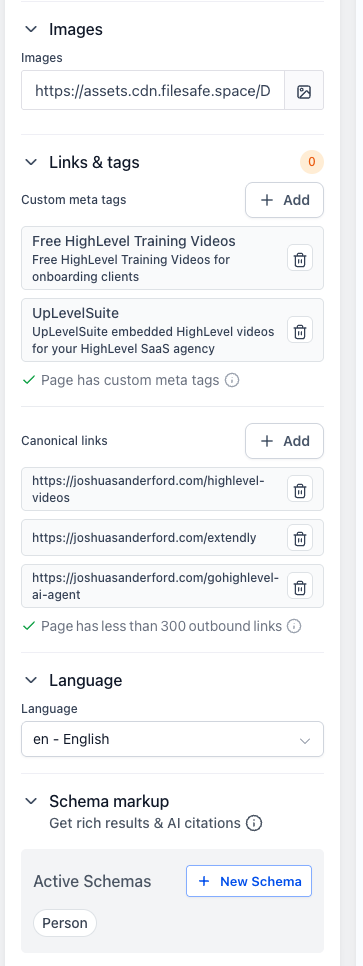
For anything nested, unusual, or beyond what the generator supports, write it yourself and inject it. Page Settings > Tracking Code > Header, wrapped in a script tag with type application/ld+json.
You want hand-written schema when you are linking entities together with @id references, building a nested Organization with departments, marking up complex offers, or maintaining a single schema graph across a site.
Reference @id linking is the technique worth learning. Give your Organization a stable @id, then reference that same @id from every other schema block on the site instead of repeating the details. You end up with one coherent entity graph rather than forty disconnected fragments, which is precisely what AI systems reward.
Validate everything
Two tools, both free, both take a minute:
- Google Rich Results Test tells you what Google can actually use.
- Schema.org Validator tells you whether the markup is technically valid regardless of what Google supports.
Then check Search Console's Enhancements reports a week or two later, which is where real-world errors surface across the whole site rather than one page at a time.
Common mistakes: dates in the wrong format, prices as strings with currency symbols embedded, marking up content that is not visible, and leaving placeholder values from a template in production.
2. Core Web Vitals on GoHighLevel hosting
You do not control the server, the CDN or the caching layer. You control what you put on the page, and that is where essentially all of the damage happens anyway.
Largest Contentful Paint
LCP measures when the biggest visible element finishes rendering. Target is under 2.5 seconds. On a GHL page the LCP element is almost always the hero image or the hero background.
What ruins it:
- Background video in the hero. It looks great and it is the most expensive decision you can make above the fold. If you must have one, use a poster image so something paints immediately, and never autoplay video on mobile.
- Oversized images. A 4MB PNG scaled to 800px in CSS still downloads 4MB. Export at the size you display, convert to WebP, compress. This alone fixes most LCP failures.
- Web fonts blocking text. Use font-display swap so text renders in a fallback immediately rather than waiting.
- Lazy loading the hero. Lazy loading is correct for everything below the fold and wrong for the LCP element, because it delays the exact thing being measured.
Cumulative Layout Shift
CLS measures how much the page jumps around while loading. Target is under 0.1. This is the metric GHL sites fail most often, and it has three causes.
- Images without dimensions. Always set width and height attributes. The browser then reserves the space before the image arrives. This is the single highest-value fix available.
- Embeds that load late. Forms, calendars and iframes render at zero height and then expand, shoving everything below them down the page. Wrap each in a container with a min-height matching the loaded state. Measure the loaded height in dev tools, set it, done.
- Fonts swapping metrics. A fallback font with different dimensions causes a reflow when the web font arrives. Pick a fallback with similar metrics, or accept a small shift.
Interaction to Next Paint
INP measures responsiveness. Target under 200ms. On GHL pages this is almost entirely third-party script weight: chat widgets, heatmap recorders, multiple pixels, and analytics tools nobody remembers installing.
Audit your tracking code twice a year. Load the site with the network tab open and account for every third-party request. Anything you cannot justify, remove. A chat widget alone can be several hundred kilobytes of JavaScript competing with your page for the main thread.
How to measure
Use PageSpeed Insights for the lab and field data, and Search Console's Core Web Vitals report for real users across the whole site. Trust the field data over the lab score. A 92 in the lab and failing field data means your real visitors are on worse devices and worse connections than your test.
3. Custom code injections
Everything below goes in Tracking Code, either globally in site settings or per page.
Hreflang
If you serve multiple languages or regions, hreflang tells search engines which version to show whom. GHL has no native field, so inject link tags into the head, one per version plus an x-default. Every version must reference every other version including itself, or the whole set is ignored.
Dynamic canonicals
Occasionally you need a canonical that depends on the URL, most often to strip query parameters on a page that receives a lot of UTM-tagged traffic. A few lines of JavaScript that rewrite the canonical href to the clean path handle it.
Two warnings. Google does execute JavaScript but it does so on a delayed second pass, so a JavaScript canonical is less reliable than a static one. Use the static field wherever it can do the job and reserve the dynamic approach for cases it genuinely cannot.
Open Graph overrides
GHL covers the standard OG fields. Inject manually when you need Twitter card specifics, multiple images, article metadata like published time and author, or video OG tags.
4. AI content tooling and E-E-A-T
GoHighLevel bundles Search Atlas tooling under SEO > Launch Advanced SEO. You get an on-page audit, content optimisation suggestions, and generation features.
What it is good at
The on-page audit is the highest-value part and the least glamorous. Run it monthly. It surfaces missing titles, duplicate meta descriptions, missing alt text, broken internal links, orphan pages and heading problems. This is exactly the sort of maintenance work that never gets done manually and quietly accumulates into a real drag.
Internal linking suggestions are genuinely useful on a site past about thirty pages, where you cannot hold the whole link graph in your head.
Content briefs and gap analysis are a good input for planning. Treat the output as a research summary, not a plan.
What to be careful with
Published AI-generated content, without heavy editing, is the fastest way to make your site indistinguishable from everyone else's.
Google's guidance is that it rewards helpful content regardless of how it was produced, and penalises content produced primarily to manipulate rankings. In practice, generic AI content fails not because a machine wrote it but because it contains nothing that was not already on the first page of results.
The framework is E-E-A-T: Experience, Expertise, Authoritativeness, Trustworthiness. AI is structurally incapable of the first one. It has never priced a job, lost a client, or found out the hard way which snapshot breaks on import.
So my rule is simple. AI for structure, research, outlines, first drafts of routine sections, and cleanup. Human for anything involving a number you measured, an opinion you hold, a mistake you made, or a recommendation you would defend in front of a client.
Concretely, on every piece:
- A named author with a real bio, a photo, and links to real profiles, marked up with Person schema
- At least one thing in the article that could only have come from having done the work
- Original data, screenshots, or examples from your own accounts wherever possible
- Clear dates, and genuine updates when the platform changes
- No claim you cannot back up
That is also, not coincidentally, what gets you cited by AI search. These systems favour sources that are specific, verifiable and attributable. Generic content is not cited by anything, human or machine.
5. Reporting and client dashboards
The last mile of technical SEO is proving it worked to someone who does not care about Core Web Vitals.
GoHighLevel's report builder can pull Search Console data, rank tracking, local heatmaps, site audit scores, and pipeline data into one white-labelled dashboard, scheduled monthly.
What I put in a client SEO report, in order:
1. Leads from organic. The only number the owner cares about. Everything else is explanation. 2. Heatmap comparison against last month, for local clients. Visual and instantly understandable. 3. Rank movement on tracked keywords, wins and losses both. Only reporting wins destroys your credibility the first time they check a term themselves. 4. Search Console trend: impressions and clicks over time. 5. Site health: audit score and what was fixed this month. 6. What we are doing next month. One short list.
Two pages. Automated. Scheduled on the first of the month.
The temptation is to include everything the platform can export, because volume looks like value. It does the opposite. A two-page report the client reads beats a twenty-page report they do not.
Wrapping the series
Across five parts: the CMS mechanics and where every field lives, a clean launch, a migration that does not lose rankings, local and multi-location, and the advanced technical layer.
None of it is complicated. GoHighLevel does not hold your hand the way WordPress plugins do, which means the difference between a GHL site that ranks and one that does not comes down almost entirely to whether someone built the habit of doing these things deliberately.
If you want a starting point, run the on-page audit today and fix whatever it finds. That single afternoon puts you ahead of most sites on the platform.
GoHighLevel can generate and pre-render page titles, descriptions, and social tags with AI Studio, and score every page with the Search Atlas plugin. See the time it saves a business owner and the revenue it adds for an agency.
See GoHighLevel's SEO toolsJoin the free Jumpstart community and grab the extended GHL trial.
The full unbranded video library - 62 videos in one GHL install, plus the Jumpstart community.
Request your invite to my private GoHighLevel community
Over 1,700 agencies, beginners, and business owners sharing what actually works in GoHighLevel. Drop your email and I'll send your invite.