
Part two of the GoHighLevel SEO series. The exact pre-launch checklist I run on a brand new GHL site: domain and SSL, indexation control, sitemaps and Search Console, hub and spoke architecture, and the first audit on day one.

This is part two of a five part series on SEO inside GoHighLevel. Part one covered the mechanics: where every field lives and how the CMS thinks. This part is about the launch itself.
A brand new website has one job in its first ninety days: get found, get crawled cleanly, and give Google an obvious reason to come back. Most new GoHighLevel sites fail at this for boring reasons. The domain is half connected. Thank you pages are indexed. The sitemap was never submitted. Nobody ever looked at Search Console.
None of that is hard to fix. It is just easier to do before launch than after, so here is the order I do it in.
1. Pre-launch technical infrastructure
Custom domain setup
Go to Settings > Domains > Add Domain. GoHighLevel will give you the DNS records it wants. In practice you are doing one of two things:
- Root domain (yoursite.com): an A record pointing at the IP GHL gives you, or an ALIAS/ANAME record if your DNS host supports it.
- Subdomain (www.yoursite.com): a CNAME pointing at the GHL target.
Add the records at your registrar, then wait. Propagation is usually minutes but the honest answer is up to 48 hours. Do not start troubleshooting for at least an hour. Verify with a DNS lookup tool rather than by loading the site in your own browser, because your browser and your router both cache aggressively and will lie to you.
A mistake I see constantly: people add the record at their registrar while their DNS is actually being served by Cloudflare or their old host. Find out who is authoritative for the domain first, and make the change there. Everywhere else is decoration.
If you are on Cloudflare, set the record to DNS only (grey cloud) for the initial connection. Proxying before GHL has issued the certificate is the single most common cause of an SSL loop.
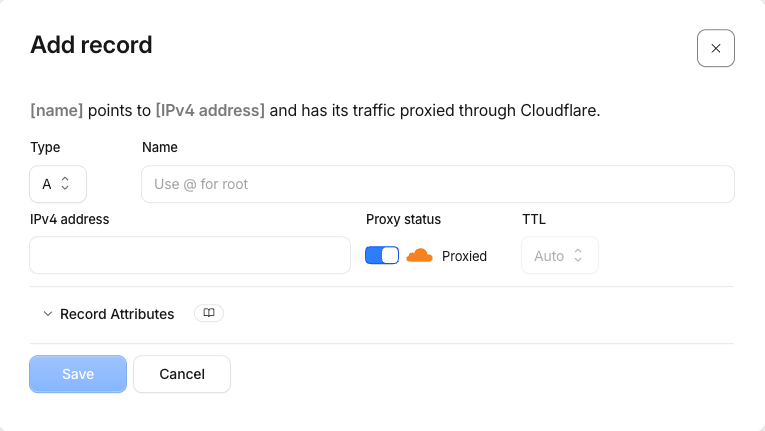
Two ways to connect: authorised or manual
GoHighLevel will offer you an authorised connection if your DNS sits with one of the registrars it integrates with, GoDaddy and Cloudflare being the two I hit most often. You click authorise, sign in at the registrar in the popup, approve the request, and the records are written for you. It takes about ninety seconds and it removes the typo risk entirely, so take it when it is offered.
Everyone else adds records by hand. In the same Domains screen, choose the product the domain is for (site, funnel, blog, store or webinar), enter the exact hostname, then pick the manual option. GoHighLevel prints the records it expects. Copy them character for character. The two failures I see are a trailing dot pasted into a value that does not want one, and someone typing the root domain into the host field where the registrar already appends it, producing yoursite.com.yoursite.com.
A quick note per registrar, since the wording differs more than the work does:
- Cloudflare: DNS tab, Add record, and set proxy status to DNS only for anything pointing at GHL.
- GoDaddy: My Products, Manage DNS, then Add under Records. Use @ for the root and www for the subdomain.
- Namecheap: Domain List, Manage, Advanced DNS, then Add New Record under Host Records. Save All Changes at the end or nothing sticks.
- Squarespace: Settings, Domains, then DNS Settings, and return to GoHighLevel to re-run the check once saved.
Then leave it alone. Refreshing the connection screen every thirty seconds does not make DNS travel faster.
SSL and HTTPS enforcement
GoHighLevel provisions the certificate automatically once DNS resolves. This can take up to a few hours after propagation. Until it completes you will see certificate warnings, which is normal and not a reason to start deleting records.
Once it is live, load the site and confirm the padlock. Then check that http:// redirects to https:// and that there is no mixed content, which usually comes from an image or script you hardcoded with an http:// URL somewhere in a custom code block.
www versus non-www
Pick one. It genuinely does not matter which, it matters that you only have one. Two versions of a site that both resolve is the oldest duplicate content problem there is, and it splits whatever authority you earn across two addresses.
In Settings > Domains, set your primary domain and enable the redirect for the other version. Then test it manually: type the non-primary version into a fresh browser and confirm it lands on the primary with a 301.
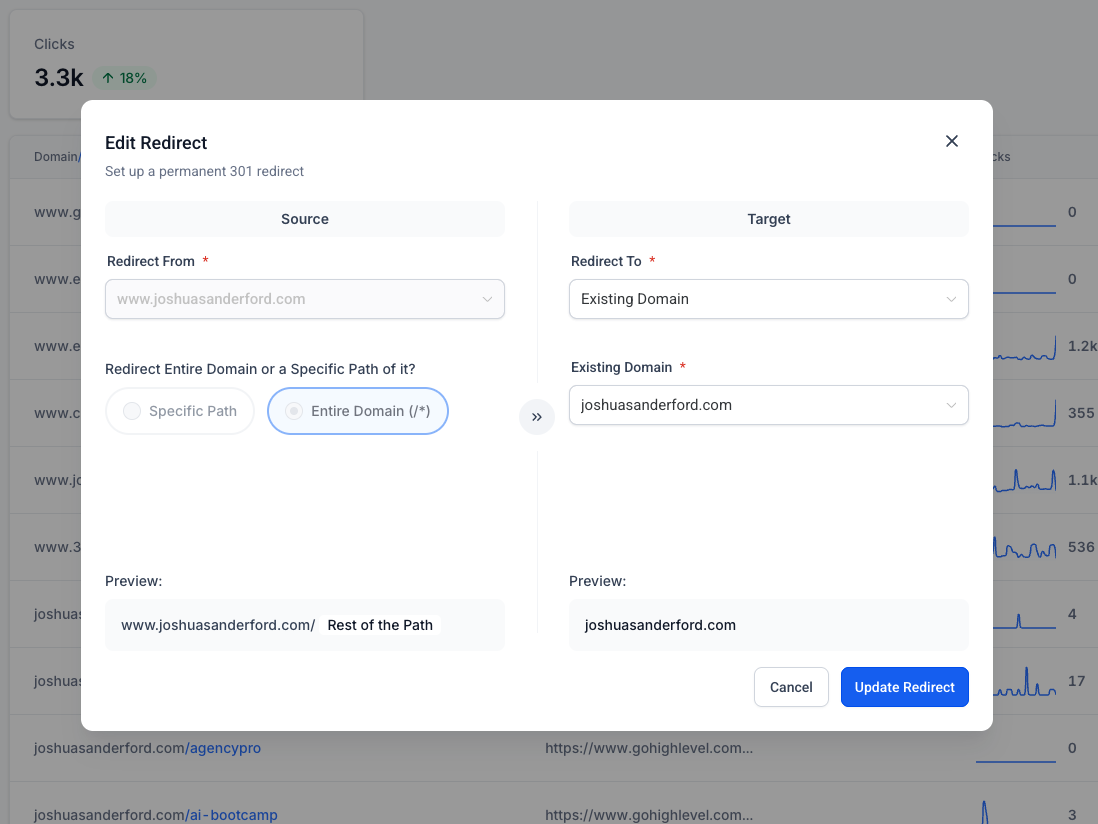
Do the same test for trailing slashes. /services and /services/ should not both return a 200 with the same content.
When the domain will not connect
Almost every stuck connection I have debugged comes down to one of five things, and they all look identical from the outside: the site does not load and GoHighLevel keeps saying it cannot verify.
- An old A record is still there. A hostname can only point at one place. If yoursite.com already has an A record from your previous host and you add the GHL one alongside it, traffic splits between them at random. Delete the old record rather than adding to it.
- An AAAA record is quietly winning. AAAA is the IPv6 equivalent of an A record, and browsers on IPv6 connections prefer it. A leftover AAAA sends a slice of your visitors to a dead server while the site looks fine to you. If you are not deliberately serving IPv6, remove it.
- A CAA record is blocking the certificate. CAA records name which authorities may issue certificates for your domain. If one exists and does not include the issuer GoHighLevel uses, DNS resolves perfectly and SSL never completes. Either add the required issuer or drop the CAA record.
- The values do not actually match. Compare what the registrar shows against what GoHighLevel asked for, one character at a time, including the host field. A mismatched value and a missing value fail the same way.
- The domain is attached somewhere else. A hostname can only be claimed by one GoHighLevel location at a time. If it is still connected in an old sub-account, a test account, or a client account you built months ago, disconnect it there first.
Diagnose with a public DNS checker rather than your own browser, and check both the root and the www version separately. If the checker shows the right values worldwide and the connection still fails, the problem is a conflicting record type you have not looked at yet, not propagation.
2. Indexation and crawl control
This is the part almost everyone skips, and it is the part that separates a clean launch from a messy one.
The indexing toggle
Every page and funnel step in GoHighLevel has a setting under Sites > Websites (or Funnels) > Page Settings that controls whether search engines are allowed to index it. It is a per-page switch and it defaults in your favour more often than not, but never assume.
Here is the split I use on a typical local business site.
Index these:
- Homepage
- Service pages
- Location pages
- About and contact
- Blog posts and the blog index
- Pricing
- Genuinely useful free tools
Do not index these:
- Thank you pages
- Order confirmation and upsell steps
- Calendar booking steps that live inside a funnel
- Lead magnet delivery pages
- Any page whose only purpose is to be reached after a form submission
- Duplicate variants you built for ads or A/B tests
The reason is not that thank you pages hurt your rankings directly. It is that they clutter your indexed footprint with pages that have no search intent, they show up in Search Console as low-quality results, and worst of all a thank you page ranking in search means people can reach your lead magnet without ever giving you an email address.
Unpublishing a page instead of hiding it (new in August 2026)
Until recently the only ways to get a page off a live site were to delete it, which loses the page and its history, or to give it an obscure URL and hope nobody found it. GoHighLevel now has Single Page Unpublish: open the page's Options menu in the funnel or website page list, or in the builder's pages side panel, and choose Unpublish.
- The rest of the site stays live, and the domain's SSL and DNS are not touched.
- You choose what happens at the old URL: a standard 404, a redirect to another page in the same funnel or website, or a redirect to an external URL. Leave it blank and visitors get a default 404.
- Edit Redirect Link lets you change that destination later without republishing.
- The change is instant, fully reversible, and recorded with who changed it and when.
- The builder's side panel now carries the full menu for each page: Edit (rename or change the slug), Preview, Clone, Publish/Unpublish, Edit Redirect Link and Delete.
- Publishing a page on a funnel or website with no domain attached now walks you through selecting, buying or connecting a domain in the same flow.
Use it for seasonal promos, offers you have paused, and old campaign pages. Noindex is still the right tool for a page that must stay reachable but should not rank, such as a thank you page. Unpublish is for content that should not be reachable at all, and it is now the safer option because the redirect decision is part of the same step.
Crawl waste
New sites get a small crawl budget. Google will fetch a handful of pages, decide whether the site is worth more attention, and adjust. If half of what it fetches is funnel plumbing, you have spent your first impression badly.
Ninety percent of crawl waste on GHL sites comes from three sources: funnel steps that should be noindexed, duplicated pages left over from testing, and old preview URLs that never got cleaned up. Handle those and you are ahead of most of your competitors.
Robots.txt
You can edit robots.txt at the domain level in Settings > Domains > select your domain > Manage. Keep it simple. A restrictive robots.txt written by someone guessing is far more damaging than no robots.txt at all.
A sane starting point:
User-agent: *
Allow: /

Sitemap: https://yourdomain.com/sitemap.xml
Add specific Disallow rules only when you have a specific problem. And understand the distinction that trips people up: robots.txt blocks crawling, the noindex tag blocks indexing. If you block a page in robots.txt, Google cannot read the noindex tag on it, and the URL can still appear in results as a bare link. For pages you want out of the index, use noindex and leave them crawlable.
3. Sitemaps and Google Search Console
Generate your sitemap inside GoHighLevel
This is the step people get wrong, so read it slowly. GoHighLevel does not hand you a finished sitemap the moment your domain connects. You create it yourself, per domain, and you choose exactly which websites and funnels go into it.
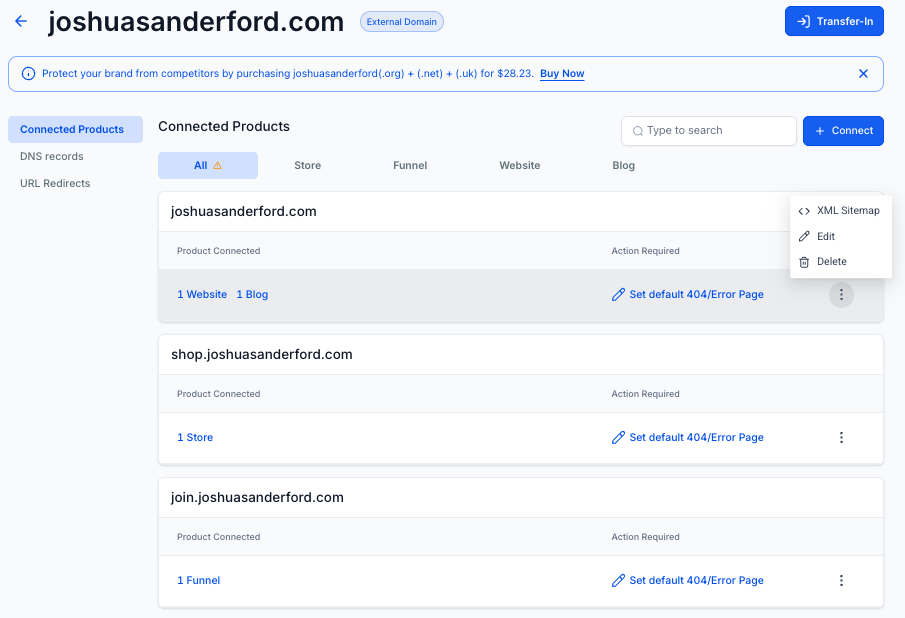
Go to Settings > Domains, find the domain, and click Manage. That opens the Connected Products page, which lists every website, funnel, blog and store attached to that hostname. Click the three dot actions icon next to the product you want, then choose XML Sitemap.
You can also reach the same screen from Sites by clicking the small gear icon in the top right of the secondary navigation, which drops you straight into Domains. If the domain has not been added to the sub-account yet, there is no Manage option to click. Connect the domain first.
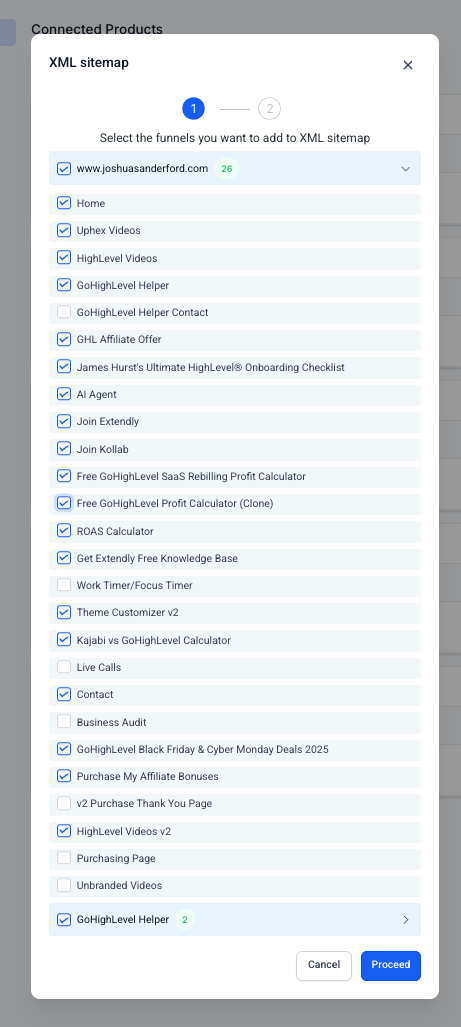
Step one of the dialog lists every website and funnel connected to that domain, grouped into accordions, each page with its own checkbox. This is a second indexing decision, and it is the one with teeth: whatever you tick here is what you are formally telling Google to crawl.
Tick the pages you actually want in search. Untick thank you pages, order confirmations, upsell steps, internal tools, clones you built for ad tests, and anything that only makes sense after a form submission. A page can be perfectly good and still not belong in a sitemap.
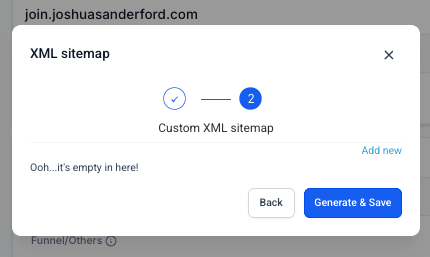
Click Proceed and you land on step two, the custom XML sitemap screen. On a first run it will tell you it is empty, which is expected. Add any custom URLs you need, then click Generate and Save.
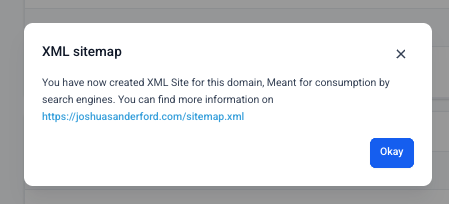
GoHighLevel confirms the file has been created and gives you the address, which is yourdomain.com/sitemap.xml.
Now load that URL in a browser before you submit it anywhere. You are checking two things: that it returns XML rather than a 404, and that every URL listed is one you meant to include. If a thank you page is in there, go back into the dialog and untick it.
One thing to keep in mind: this is per domain. Subdomains such as shop.yourdomain.com and join.yourdomain.com are separate entries on the Domains screen, each with their own Manage option and their own sitemap. If you run funnels on a subdomain, generate a sitemap there too and submit it as its own property.
Whenever you publish new pages, come back and regenerate. The sitemap is a snapshot, not a live feed.
Verify ownership in Search Console
Go to Google Search Console and add a property. You have two options:
- Domain property (recommended): verify with a DNS TXT record. This covers every subdomain and both http and https in one property. Add the TXT record wherever your DNS is authoritative.
- URL prefix property: verify with an HTML meta tag, which you paste into the head tracking code section in GHL under Sites > Websites > Settings > Tracking Code.
I use the domain property. One property, no gaps, no confusion later about which version of the site you are looking at.
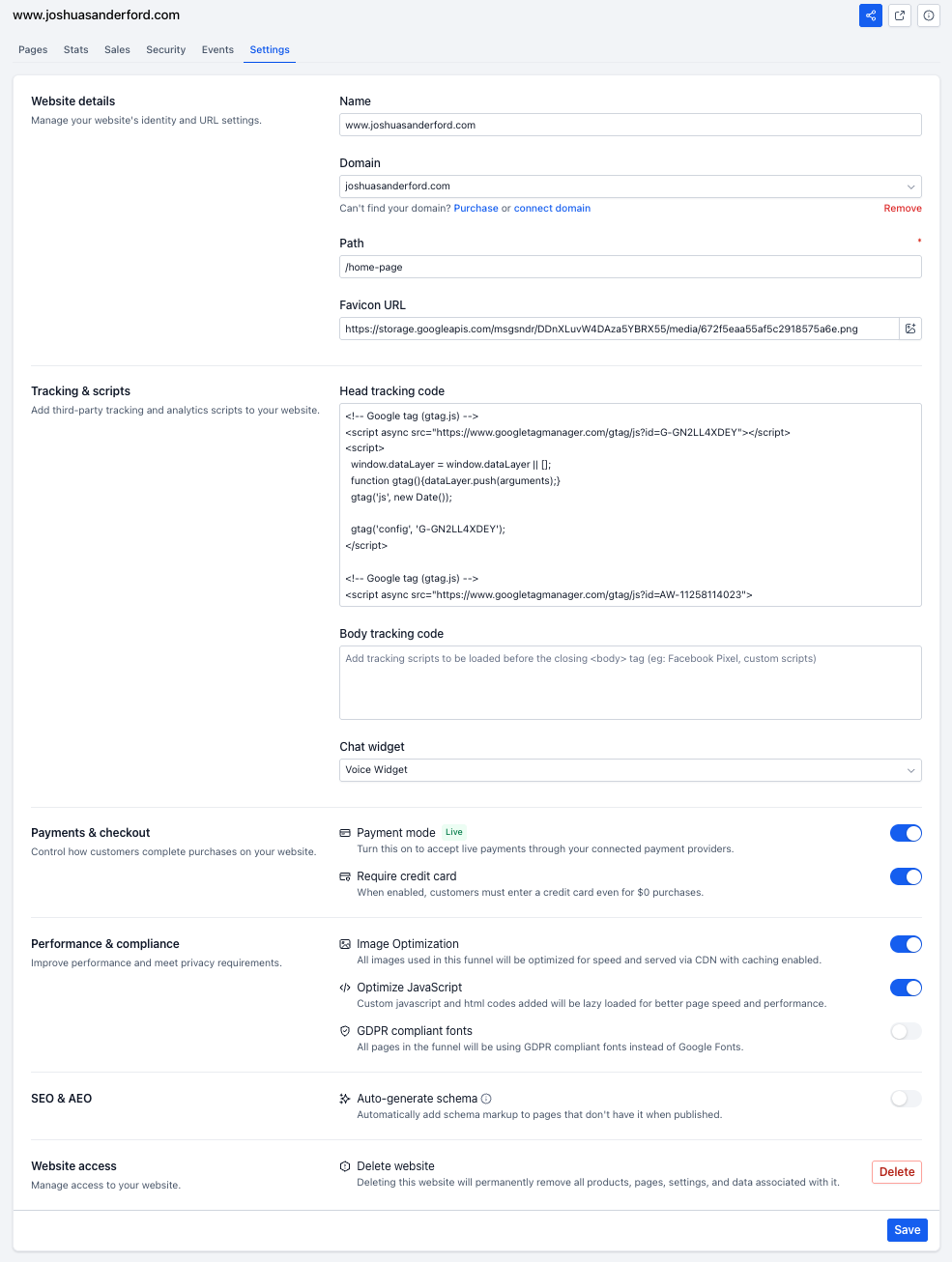
Do the same in Bing Webmaster Tools. It takes four minutes, Bing lets you import directly from Search Console, and it feeds Copilot. Given how much AI search now leans on Bing's index, skipping it is a free loss.
Submit the sitemap
In Search Console, Sitemaps > enter sitemap.xml > Submit. Then leave it alone. It will say "Couldn't fetch" for a while sometimes and then quietly succeed. Resubmitting five times does not speed it up.
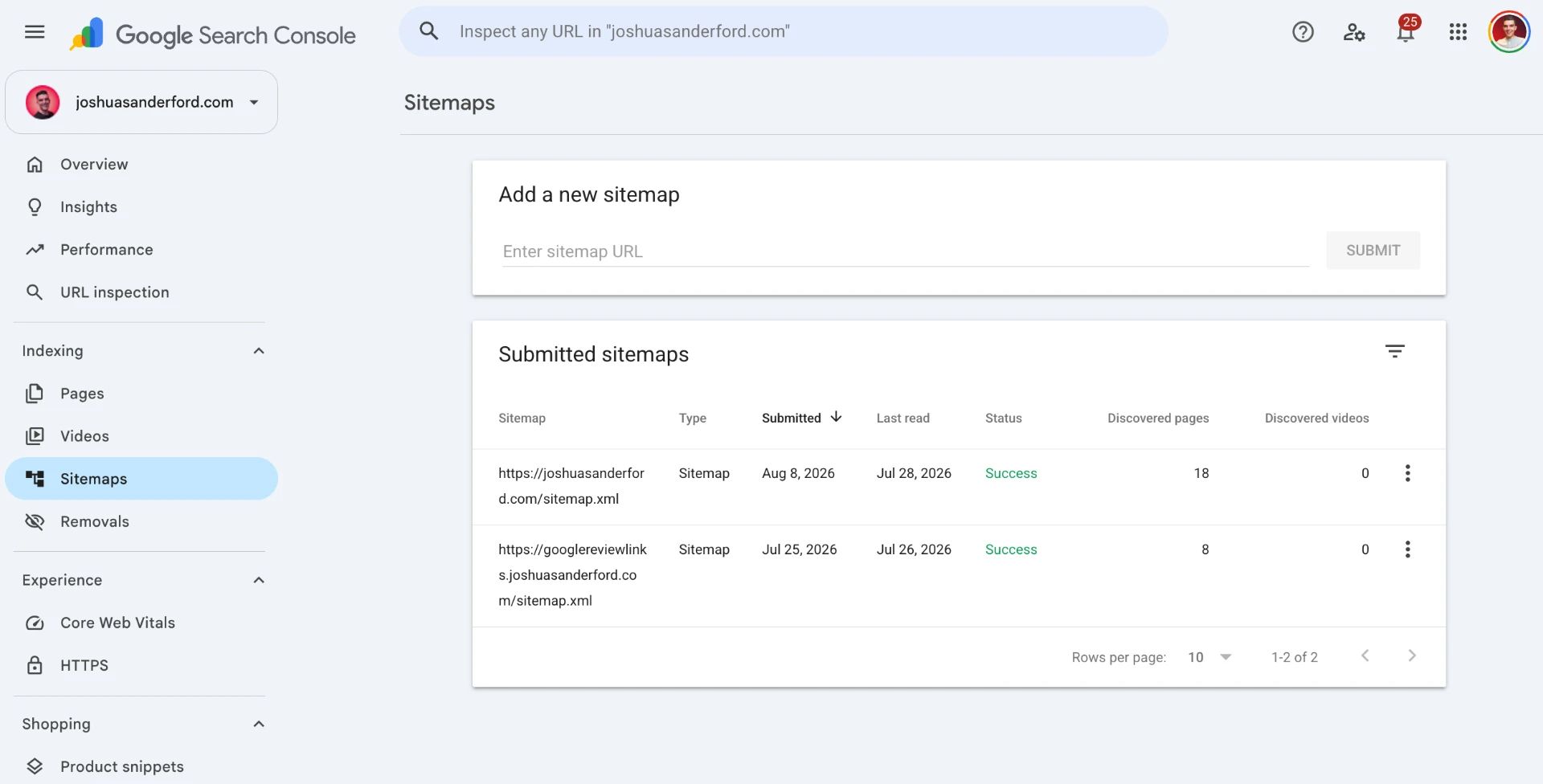
Submit one sitemap per property. If you generated a separate sitemap for a subdomain, that subdomain needs its own Search Console property and its own submission.
Connect Search Console inside GoHighLevel
GHL can pull Search Console data into its own dashboard under SEO > Site Metrics, so you can see impressions, clicks and position without leaving the platform. It is genuinely useful for client reporting because the data is right next to the pipeline the traffic feeds.
It is not a replacement for Search Console itself. The GHL view is a summary. The Pages report, the Query report with filters, and the URL Inspection tool are where actual diagnosis happens, and those live in Google's interface.
4. Topical authority architecture
Now the strategy part. A new site does not outrank an established one by being slightly better on one page. It wins by owning a narrow topic completely.
Hub and spoke
Pick one thing you want to be known for. Build a hub page that covers it broadly, then build spoke pages that each go deep on one sub-question. Every spoke links up to the hub. The hub links down to every spoke. Spokes link sideways to each other where it genuinely helps the reader.
A plumber in Fort Worth might build:
- Hub: Emergency plumbing in Fort Worth
- Spokes: burst pipe repair, water heater failure, what an emergency callout costs, how to shut off your main, after-hours availability
Five pages that reinforce each other beat twenty-five unrelated pages every time, and they are far easier to write well.
In GoHighLevel you build this with regular website pages for the hub and evergreen spokes, and blog posts for the more time-bound or long-tail material. Use a nested URL structure so the relationship is visible in the address itself: /emergency-plumbing/ and /emergency-plumbing/burst-pipe-repair/.
Internal linking through global sections
GHL global sections are the practical way to keep internal linking consistent. Build your header and footer as global elements, put your hub links in them, and every page on the site inherits the link structure. Change it once, it changes everywhere.
Do not stuff the footer with sixty links. A footer that links to your six most important pages passes far more useful signal than one that links to everything.
Anchor text
Use the words the page is actually about. "Burst pipe repair in Fort Worth" tells both a reader and a crawler what is on the other side of the link. "Click here" and "learn more" tell them nothing.
Vary it naturally though. Fifty internal links all using identical exact-match anchor text reads as manipulation, because it is.
5. Conversion copy versus content depth
Here is the tension nobody warns you about when you move onto a funnel builder.
GoHighLevel is exceptional at short, punchy, conversion-focused pages. Headline, three benefits, social proof, form. That page converts paid traffic beautifully and it will almost never rank organically, because there is nothing on it for a search engine to understand.
Organic search rewards pages that answer the question thoroughly. Paid traffic rewards pages that remove friction. These are different jobs.
You have two clean options:
1. Separate the pages. Keep tight funnel steps for ads, build deeper pages for organic. Different URLs, different jobs, no compromise on either. 2. Layer one page. Conversion elements above the fold, depth below it. The person ready to buy never scrolls. The person researching finds three thousand words of substance and the crawler finds a page worth ranking.
I use option two on most service pages and option one whenever there is meaningful paid spend involved.
Adding depth without wrecking the page
Accordions and tabs are your friend here. Content inside a collapsed accordion is still in the HTML and still counts, as long as it is present on page load rather than fetched by JavaScript when clicked. GHL's native accordion element loads the content into the DOM, so it is safe.
What is not safe is bloat. Every extra section is more markup, more images, more render work. Watch three things:
- Images: size them before uploading. A 4000px hero scaled down in CSS still downloads at full weight.
- Explicit dimensions: always set width and height on images so the browser reserves the space. This is the single biggest cause of layout shift on GHL pages.
- Embeds: forms, calendars and iframes push content down when they finish loading. Wrap them in a container with a fixed minimum height that matches the loaded state, and the shift disappears.
That last one is worth repeating because it is so common. A GHL calendar embed near the top of a page, with no reserved height, will tank your Cumulative Layout Shift score on every single visit.
6. Day one tracking and your first audit
Set up the site project
Under SEO > Add Site Project, connect your domain. This is the Search Atlas integration built into GoHighLevel, and it gives you rank tracking, an on-page audit and content recommendations without buying a separate tool.
Add your target keywords on launch day even though you rank for none of them. The value is the baseline. Three months from now you want to be able to point at where you started, and you cannot recreate that data retroactively.
Run the first audit
Run the on-page audit immediately after launch. On a fresh site it will find:
- Pages with missing or duplicated title tags, usually because a page was duplicated during the build
- Missing meta descriptions on pages you forgot
- Images with no alt text
- Orphan pages, meaning pages in the sitemap that nothing links to
- Broken links, usually pointing at pages you renamed or deleted mid-build
- Heading hierarchy problems, typically multiple H1s because a designer used heading elements for visual size
Fix all of it in week one. The list will never be shorter or easier than it is right now, and every one of these takes two minutes on a five-page site and two days on a fifty-page site.
What to watch for the first month
- Week 1: confirm indexation. Use URL Inspection in Search Console on your homepage and two key pages. If they are not indexed, request indexing manually.
- Week 2: check the Coverage report. Anything unexpectedly excluded needs a reason.
- Week 3: first impressions should appear in Search Console. Positions will be terrible. That is fine, impressions mean you exist.
- Week 4: look at the Query report. The queries you are appearing for tell you what Google currently thinks your site is about, which is often not what you intended. That gap is your content roadmap.
The short version
Connect the domain properly, force one canonical version, noindex everything that is funnel plumbing, submit a clean sitemap to both Search Console and Bing, build a small tight cluster of pages rather than a sprawl, give organic pages real depth, and run your first audit on launch day so the list stays small.
None of this is clever. It is just done in the right order, before launch, when it costs you an afternoon instead of a quarter.
Part three covers what happens when you are not starting fresh: migrating an existing site onto GoHighLevel without losing the rankings you already have.
GoHighLevel can generate and pre-render page titles, descriptions, and social tags with AI Studio, and score every page with the Search Atlas plugin. See the time it saves a business owner and the revenue it adds for an agency.
See GoHighLevel's SEO toolsJoin the free Jumpstart community and grab the extended GHL trial.
The full unbranded video library - 62 videos in one GHL install, plus the Jumpstart community.
Request your invite to my private GoHighLevel community
Over 1,700 agencies, beginners, and business owners sharing what actually works in GoHighLevel. Drop your email and I'll send your invite.